To search
Softonic Rating:
Good:7/10
License:
Evaluation
Added:
June 9, 2008
Publisher:
Website
File size:
1.2 MB
Downloads:
9
Cyril Roger

“Attach labels to your favorite photos”

by Cyril Roger

One thing I like in Flickr is being able to add labels in your pictures, to highlight certain details. Although you can't really do that in iPhoto on your Mac, you can use an application like PhotoNotes.

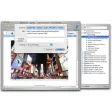
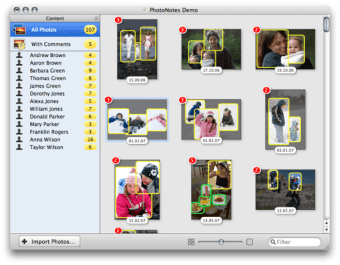
You start out by importing the photos you want to label, either from your Finder or by dragging and dropping them from iPhoto. The program will divide photos into those with comments and those without. To add labels to a photo all you need to do is double click on one, then drag on any section you want to label. PhotoNotes will let you add names from your Address Book or any sort of content.

The application will also allow you to export images as html so you can share them on the net.

PhotoNotes made adding labels very easy, however I was a little annoyed having to once again import pictures from another source just for this. It would also have been nice to have more customization features for the labels, like font or color.

You'll enjoy PhotoNotes if you want to quickly add labels to your photos and aren't annoyed by having to import your pics into yet another program.

Languages:

English

Limitations:

Limited to three labels

OS requirements for PhotoNotes:

  • OS: Mac OS X
Pros
  • Easy to add labels
Cons
  • No way to edit labels
  • Having to import photos
Did you like this review?
4 of 6 users liked it (67%)

From the publisher of PhotoNotes

PhotoNotes is an easy way to attach labels to your favorite photos. You can mark friends and family, buildings, special places, whatever you like.

It is tightly integrated with the Mac OS X Address Book, so it is easy to pick a name for a label. Labels are smart: When you have birthdays in your Address Book, PhotoNotes automatically displays the age of that person, using the camera date.

Finding photos of friends is easy with PhotoNotes' extensive Spotlight support. Your albums are automatically indexed. When you search for a person from Spotlight, PhotoNotes automatically displays that person's photos and highlights him or her in the thumbnail previews.

You can also export your labelled photos as an interactive HTML page.

PhotoNotes options

PhotoNotes Options
Softonic Rating:Good
User Rating
Your opinion is important!
equestrian

Download stats

Related

Related searches


View all